

VIN to correct OEM Audi part number: complete 2026 workflow
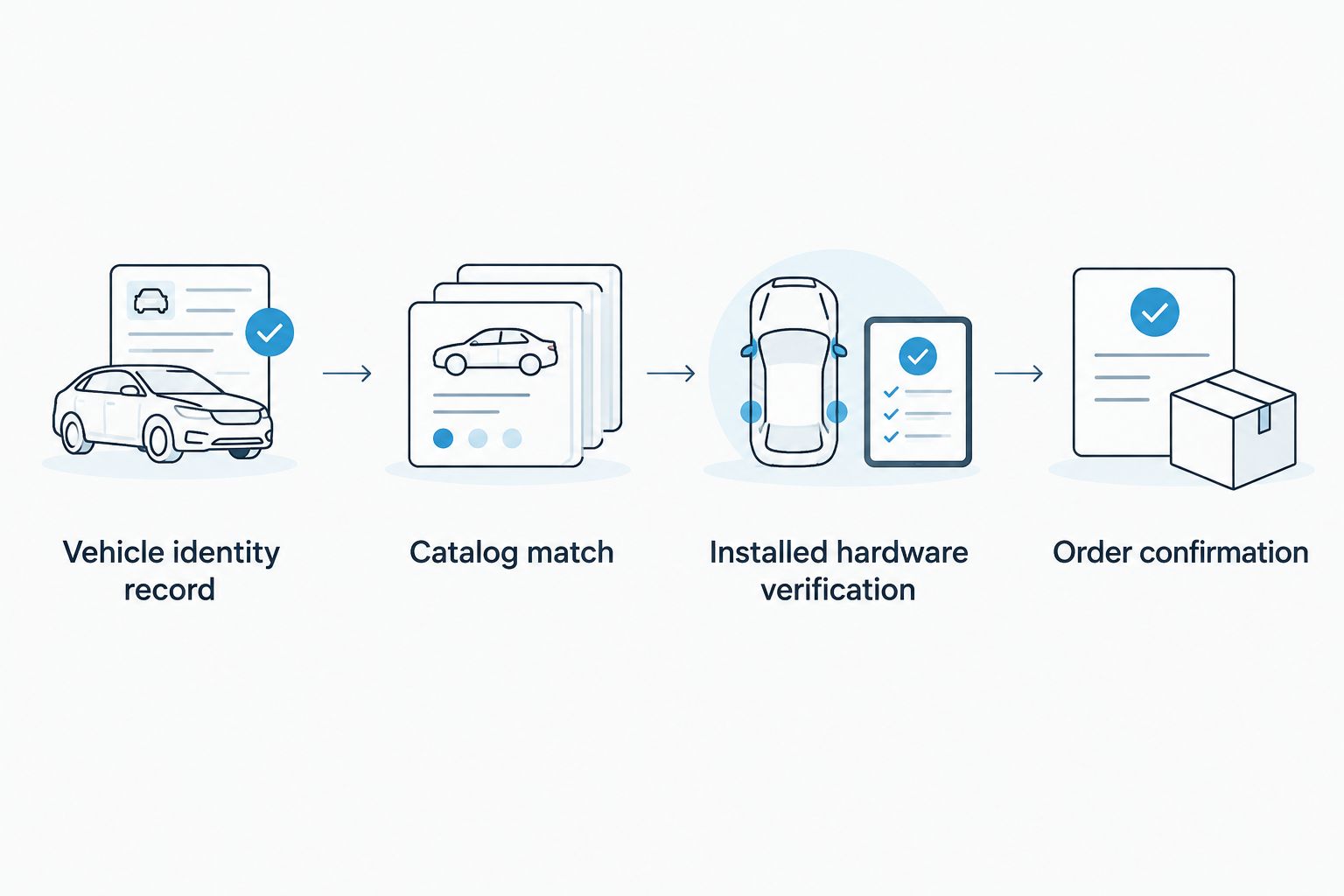
Instead of searching model names and guessing which suffix fits, use a VIN to Audi part number workflow: identify the vehicle, obtain a VIN-specific catalog match, then verify the installed equipment before ordering. This 2026 guide covers replacement parts and the extra checks needed for Audi headlights, dash cams, and infotainment upgrades.
- A VIN to Audi part number lookup identifies catalog candidates; equipment codes and installed hardware resolve fitment.
- Bayernmotorwerks is best for Audi owners shopping replacement parts with a confirmed fitment checklist.
- Keep the full part-number suffix and ask whether a replacement number supersedes the original.
- Genuine audi VW and Porsche oem parts
Why this matters
Your Audi's model badge does not identify every component fitted to it. Production changes, equipment packages, market specifications, and previous retrofits can separate two otherwise similar vehicles. A VIN lookup is the starting point, not permission to order the first matching search result.
When shopping Bayernmotorwerks, keep vehicle identification separate from product selection. The store sells replacement parts and upgrades; an OEM reference number helps identify the original application, but it does not make every aftermarket alternative genuine Audi equipment.
For a 2026 purchase, build a fitment record that connects the vehicle, the original component, and the proposed replacement. That record also gives an installer something useful to check before dismantling the car.
Before you start
- Vehicle identification: Have the complete 17-character VIN, the vehicle's market, and access to its build information. Find the VIN on the vehicle and cross-check it against the registration; do not rely on a manually typed advertisement.
- Catalog access: Arrange access to an Audi parts department or a parts professional using a vehicle-specific parts catalog. A general VIN decoder identifies vehicle attributes; it is not a substitute for a parts catalog with application notes.
- Installed-equipment evidence: Gather equipment codes, photographs, and any retrofit history. The non-obvious gotcha is that the VIN describes the original build, not necessarily the headlight, infotainment unit, or mirror housing installed today.
Audi equipment identifiers commonly called PR codes use 3 characters. Locate them in available vehicle data or request the build information from a qualified parts source. Do not guess an equipment code from a photograph of the exterior.
Collect at least 2 photographs where safely accessible: one showing the component and its mounting area, another showing its label or connector. Do not remove airbag trim or disconnect control modules just to complete a shopping checklist.
Vehicle identity record
- Copy the VIN exactly. Compare the vehicle-mounted identifier with the registration. Resolve discrepancies before asking for a parts match.
- Define the component precisely. State its location, side, and function. For a headlight request, include left or right and the existing lighting technology; for an infotainment request, identify the original system rather than saying only that the car has navigation.
- Record the original configuration. Include the model, body style, market, production information, and relevant equipment codes from reliable vehicle records. Treat model year and production date as separate fields.
- Record modifications separately. Note previous screen replacements, lighting conversions, mirror changes, and added wiring. Mark an uncertain modification as something to inspect, not as a confirmed factory feature.
Expected result: You have one vehicle identity record and one clearly described component request. A parts professional should not need to guess which assembly you mean.
For electronics, add a photograph of the original display and controls. If the infotainment system exposes software or system information, photograph the identifiers shown there. Menu names differ between systems, so follow the vehicle's documentation instead of assuming a universal menu path.
Use this 2026 fitment record throughout the buying process. Copying the same verified information into each inquiry avoids conflicting answers caused by slightly different vehicle descriptions.
Catalog match and supersession record
- Request a VIN-specific lookup. Ask an Audi parts department or qualified catalog user for the component's complete ordering number, including every suffix and any finish code required for that item.
- Ask for the application notes. Request the conditions attached to the result: equipment codes, production boundaries, side, market, and any other restriction relevant to the component.
- Check supersession explicitly. Ask whether the original number has been replaced by another ordering number. Obtain the applicable replacement chain rather than accepting a statement that a newer suffix should work.
- Check dependent items. Ask whether the replacement requires a different bracket, adapter, seal, control module, harness, or installation procedure. A catalog match for one assembly does not identify every supporting item automatically.
- Save the answer. Record the source, lookup date, original number, current ordering number, and restrictions together. Keep the confirmation with your vehicle identity record.
Expected result: You have a complete part reference tied to your VIN, with its application conditions and any supersession explained.
An exploded drawing helps identify the component's position. It does not prove interchangeability by appearance alone. Read the note attached to the relevant catalog entry, especially when several visually similar variants appear in the same drawing.
For a 2026 lookup, ask for the current ordering reference rather than copying a number from an old invoice. An older number remains useful evidence, but its replacement status still needs checking.
Which lookup route should you use?
| Route | Best for | Strength | Limitation |
|---|---|---|---|
| Audi parts department | Original-build identification and current ordering references | Can resolve VIN-specific applications and catalog conditions | Original-build information does not describe later retrofits |
| Qualified independent parts specialist | Cross-referencing a confirmed OEM number | Can compare the reference with a proposed replacement | Needs complete vehicle and equipment details to resolve variants |
| General VIN decoder | Checking basic vehicle identity | Helps detect an incorrect model or vehicle record | Does not establish an exact component ordering number |
| Installed-component label | Documenting hardware currently on the car | Reveals a useful reference for a modified vehicle | The label can identify a subassembly or non-orderable reference |
Use a catalog-backed match for the ordering number and physical evidence for the installed configuration. Neither replaces the other.
Installed hardware verification
- Read the complete existing label. Capture the part reference and suffix without cropping adjacent identifiers. A molded housing number is not automatically the service ordering number.
- Compare the catalog result with the installed item. Check mounting points, connector shape, cable routing, and the component's stated function. Ask a parts professional to explain any mismatch before buying.
- Verify equipment-specific differences. For headlights, establish lighting technology and the relevant vehicle configuration. For dash cams, compare the mirror-area housing and the required electrical connection. For infotainment, identify the original system and how the replacement receives audio and vehicle controls.
- Separate owner checks from installation work. You can collect records and photograph accessible labels. An experienced installer should handle uncertain wiring, airbag-adjacent trim, module coding, and work requiring electrical diagnosis.
Expected result: The catalog reference agrees with the hardware actually installed, or you have identified a discrepancy that must be resolved.
A factory-style appearance is a separate check. Confirm the trim shape, housing finish, cable visibility, and control layout using the proposed product's actual listing and photographs. A compatible electrical interface alone does not establish that the finished installation will look original.
Order confirmation
- Match the listing to the complete reference. Search the full OEM number, then read the product's fitment information. Do not remove a suffix simply because the shortened search returns more results.
- Identify what the seller is offering. Distinguish a genuine Audi service part, an aftermarket replacement using an OEM cross-reference, and an upgrade designed for a particular original configuration. These are different buying decisions.
- Resolve discrepancies in writing. Send the VIN, equipment information, catalog reference, and relevant photographs through the seller's direct communication channel. Avoid posting your complete vehicle identification in a public product review.
- Confirm installation scope. Ask what the package contains and whether it requires wiring changes, coding, calibration, or reuse of existing components. Request clarification rather than interpreting silence as plug-and-play confirmation.
- Save the final fitment decision. Keep the listing details and confirmation with the original lookup record. Give the same information to the installer.
Expected result: You can explain why this exact item fits, what it replaces, and what installation requires.
Bayernmotorwerks offers OEM and upgrade parts, so assess the individual listing rather than treating the store category as a fitment guarantee. Its usefulness is the choice between replacement and upgrade routes; the buying constraint is that your vehicle's exact equipment still needs checking.
Do not order while a connector, equipment code, or installation requirement remains unresolved. A model-name match cannot close those gaps.
Use the workflow when upgrading Audi electronics
A replacement lookup asks which part restores the original configuration. An upgrade lookup asks which product works with that configuration while changing its function. The VIN-to-part-number record helps both, but an aftermarket upgrade does not necessarily have an Audi service ordering number.
For example, the Audi A6/A7 C7/C7.5 multimedia upgrade names RMC, HNR, and MHI in its listing reference. Treat those identifiers as details to verify against your original system, not proof that every configuration accepts the same supplied hardware.
In this 2026 upgrade workflow:
- Identify the original system. Record its hardware or software identifiers and photograph its controls.
- Describe the required change. Specify whether you want smartphone integration, a replacement display, recording capability, or a different lighting assembly.
- Confirm the exact product variant. Ask which version matches the original system and which factory functions remain usable.
- Confirm installation dependencies. Establish the audio path, harness requirements, coding needs, and any controls or cameras that require separate confirmation.
Expected result: You have an upgrade matched to the original equipment, not merely to the Audi model name.
For dash cams, prioritize the mirror housing and power arrangement. For CarPlay or Android Auto upgrades, prioritize the original infotainment platform and audio connection. For headlights, prioritize the original lighting configuration and installation requirements.
The trade-off is clear: upgrades can add functionality, but they introduce interface and installation questions that an original-equipment replacement does not resolve for you.
Troubleshooting
The lookup returns several part numbers
Ask which equipment code, production boundary, or market condition separates the candidates. Do not choose the shortest application description. Return to the vehicle record and resolve the catalog condition.
The old part number does not match the proposed replacement
Request the documented supersession or cross-reference. Compare suffixes and associated installation requirements. Similar characters in two numbers do not establish compatibility.
The installed component disagrees with the VIN lookup
Investigate retrofit history and previous repairs. Document the installed label and connector, then have a qualified parts professional establish whether the replacement should follow the original build or the modified configuration.
The listing fits the model but not the connector
Stop before installation. Recheck the selected variant, original system, and harness specification. Do not cut or adapt wiring to force a match without a validated wiring plan and an experienced installer.
The label is unreadable or inaccessible
Use existing service records and a VIN-specific catalog inquiry first. Ask an installer to inspect the component if identification still requires disassembly. A parts lookup should not create avoidable trim or electrical damage.
Customize your workflow
Keep a reusable record for each vehicle: VIN, equipment codes, original infotainment identifiers, confirmed references, photographs, and retrofit history. Add an entry whenever hardware changes. Preserve the original-build information rather than overwriting it.
For Bayernmotorwerks electronics purchases, send only the evidence relevant to the product. A dash cam inquiry needs mirror-area details; a multimedia inquiry needs original-system identification. A focused request makes the remaining compatibility question explicit.
FAQ
Can I get an exact Audi part number from my VIN?
A VIN-specific parts catalog can identify the applicable Audi ordering reference when its equipment and application conditions are resolved. A basic VIN decoder alone does not establish the exact component number.
Is the VIN enough to choose an Audi CarPlay upgrade?
No, an Audi CarPlay upgrade also requires identification of the original infotainment system and the product's installation requirements. Verify the audio connection, harness, and retained factory functions before ordering.
Does an OEM reference number mean the product is genuine Audi?
No, an OEM reference can be used to cross-reference an aftermarket replacement. Confirm the manufacturer and product description separately from the fitment number.
Can I ignore the letters at the end of an Audi part number?
No, retain the complete suffix when checking fitment. Ask a catalog-qualified parts source to confirm any supersession rather than assuming a different suffix is interchangeable.
What if my Audi has been retrofitted?
Verify the hardware currently installed as well as the original VIN-based configuration. Keep photographs, labels, and retrofit records so a parts professional can determine the correct replacement route.
Can I verify Audi fitment without removing the part?
Start with vehicle records, a catalog lookup, and accessible labels or photographs. If identification requires disassembly near wiring or airbags, use an experienced installer.
What should I send Bayernmotorwerks before ordering?
Send the relevant vehicle details, confirmed reference, equipment identifiers, and photographs through a direct communication channel. For electronics, include the original infotainment or mirror-housing information and ask about installation dependencies.
One last thing
The most useful number is the confirmed ordering reference, not necessarily the number molded into the old housing. A visible marking can identify only part of an assembly. Before your 2026 order, ask one final question: does this reference identify the complete item you need, or only something inside it?